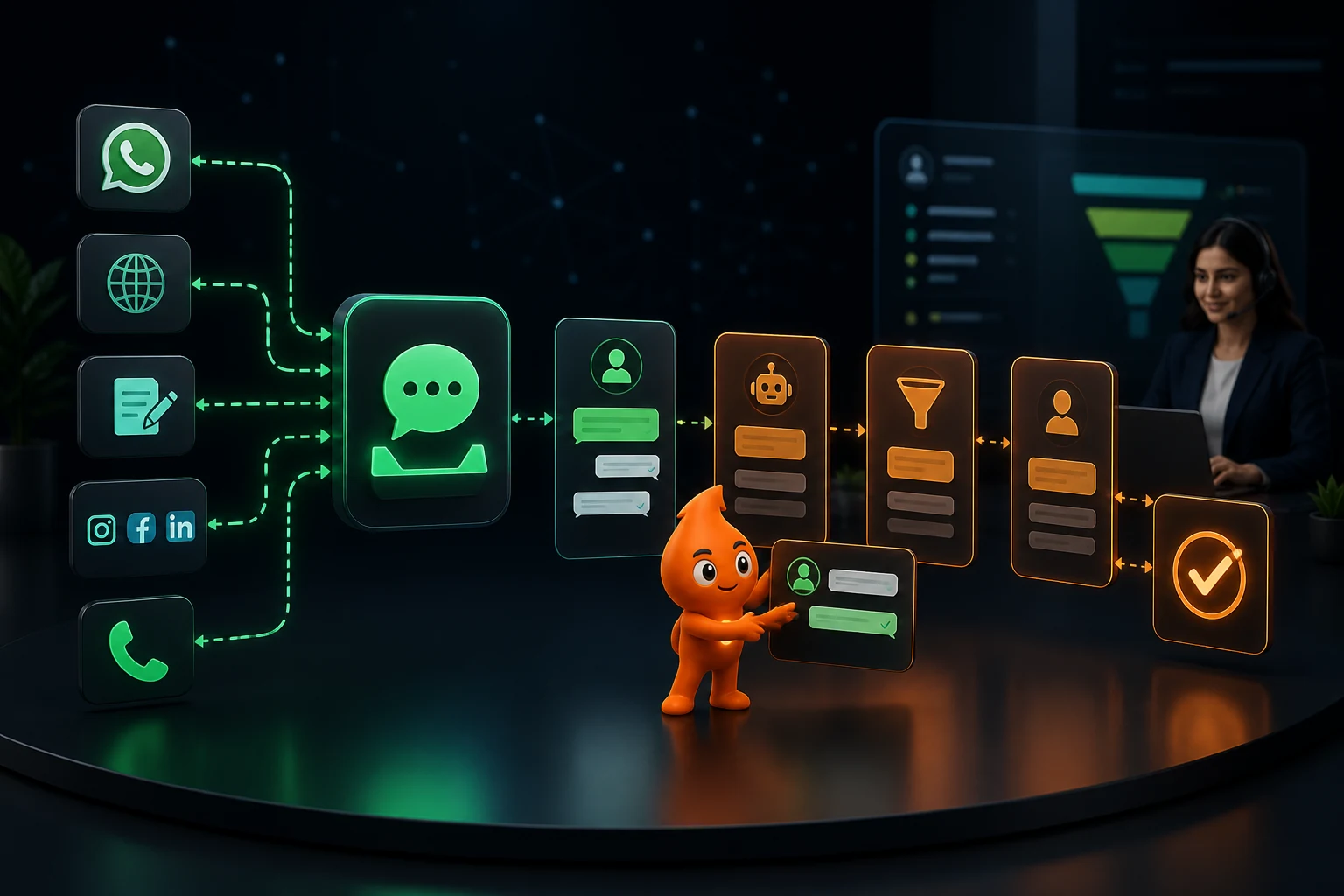
Short answer: WhatsApp lead management means every enquiry is captured into a CRM, acknowledged on WhatsApp within a minute, qualified with two or three questions, routed to a named owner, and followed up on a fixed cadence until it books, buys, opts out or is closed as lost. Automation handles speed, reminders and record-keeping; salespeople handle conversations. Outside the 24-hour window every follow-up must be an approved template sent to someone who opted in.
What does a WhatsApp lead management pipeline look like?
Leads rarely go cold because the product was wrong. They go cold because nobody replied for six hours, or because follow-up stopped after one unanswered message. Research published in Harvard Business Review on online sales leads concluded that "most companies are not responding nearly fast enough", and a buyer who has filled in several forms will usually talk first to whoever replies first. A WhatsApp CRM fixes this by making every enquiry visible, owned and time-bound.
A workable pipeline is finite. Every lead sits in exactly one stage, has one owner and one next action with a due time.
| Stage | What automation does | What a person does | Exit rule |
|---|---|---|---|
| 1. New enquiry | Creates or updates the CRM record, stores source and campaign, sends the acknowledgement | Nothing yet | Acknowledgement delivered |
| 2. Qualification | Asks 2 to 3 buttons-based questions (need, location, timeframe) | Reads answers, adds context | Qualified, nurture or disqualified |
| 3. Assignment | Routes by rule, notifies the owner, starts an SLA timer | Accepts ownership | Owner has made first human contact |
| 4. Follow-up | Sends cadence messages, creates call tasks, escalates overdue tasks | Calls, answers objections | Appointment, proposal or no response after final touch |
| 5. Appointment / proposal | Confirms, reminds, collects reschedules | Runs the visit, demo or consultation | Attended or no-show |
| 6. Outcome | Prompts the owner for a won/lost reason, updates reports | Records the reason honestly | Won, lost (with reason) or long-term nurture |
A lead that simply stays "open" is not being managed. If your CRM has more than a handful of leads with no next action date, fix that before adding any automation.
What are WhatsApp's opt-in rules for lead follow-up?
The WhatsApp Business Messaging Policy (last updated 23 September 2026) sets the rules every automated follow-up must respect:
- Number plus opt-in. You may contact someone only if they gave you their number and you have "received opt-in permission from the recipient confirming that they wish to receive subsequent messages" from you. The method is your responsibility, so keep a record of it.
- The 24-hour window. You can reply freely, including with automation, "within the 24-hour customer service window, which opens and resets with each user message". Outside it, you may send only approved message templates.
- Opt-outs everywhere. You must respect requests "either on or off WhatsApp" to block, discontinue or opt out, including removing that person from your contact list. A lead who tells your caller "don't WhatsApp me" counts.
- Human escalation. Automated replies must have "prompt, clear, and direct escalation paths", such as transfer to a human agent or a phone number.
- No sensitive data in chat. Do not ask for full card or bank account numbers or similar identifiers, and never forward one customer's chat details to another.
India's Digital Personal Data Protection Act, 2023 adds that consent must be "free, specific, informed, unconditional and unambiguous with a clear affirmative action", and withdrawing it must be as easy as giving it. In practice that means an unticked checkbox on your form ("Send me updates about my enquiry on WhatsApp"), the checkbox text and timestamp stored in the CRM, and a "Reply STOP to opt out" line in every marketing template. Our consent and template rules guide covers wording and category approval in detail.
What is a good WhatsApp follow-up cadence for leads?
Whether a message can be free-form or must be a template depends on whether the lead has messaged you in the last 24 hours. A Meta lead form or website form lead has not, so the first WhatsApp message to them must be a template. A lead who tapped a Click-to-WhatsApp ad or your click-to-chat link has messaged you, so your replies are session messages, and Meta's pricing documentation makes all messages free for 72 hours when that chat started from a Click-to-WhatsApp ad or Facebook Page button and you reply within 24 hours.
| Timing | Message type | Purpose | Stops if |
|---|---|---|---|
| Within 60 seconds | Template (form lead) or session reply (lead messaged first) | Acknowledge, confirm what they asked about, ask the first qualifying question | Lead replies (switch to session messages) |
| Within 5 to 15 minutes | Phone call by owner, logged in CRM | Human contact while intent is highest | Connected |
| +2 hours (no reply, no connect) | Template | Offer a call slot or one useful asset (brochure, price sheet, sample report) | Reply, booking |
| Day 1, evening | Template | Answer the most common objection for that product | Reply, booking |
| Day 3 | Template | Proof: a relevant result, testimonial or comparison | Reply, booking, opt-out |
| Day 7 | Template | Direct question: "Is this still a priority for you this month?" with Yes / Later / No buttons | Any answer (route by button) |
| Day 14 | Template | Close the loop politely and move to monthly nurture | Sequence ends |
| After appointment is booked | Utility template 24 hours and 2 hours before | Reminder with reschedule option | Attended, rescheduled, cancelled |
Every sequence must stop on reply, opt-out, booking, purchase, disqualification or a manual "human-led" flag. A day-3 nudge that arrives after the buyer has already spoken to your salesperson makes the business look disorganised, so the CRM stage change must stop the sequence.
What the cadence costs. On Meta's India rates as checked October 2026 (₹0.8631 per marketing template, ₹0.115 per utility template, before GST), the six templates in this cadence cost at most about ₹5.18 per lead even if all six are billed as marketing. For 1,000 form leads a month that is roughly ₹5,179 plus GST, small next to most cost-per-lead figures. Full pricing is in our WhatsApp Business API cost guide. Note that Meta's template guidelines treat any template mixing utility and promotional content as marketing, so a reminder that also pushes an offer is billed at the marketing rate.
How should WhatsApp leads be scored and routed?
Start with explicit answers, not behavioural guesswork. A score should change an action (owner, priority or cadence), otherwise it is decoration.
| Signal | Example rule | Action |
|---|---|---|
| Timeframe | "Within 30 days" selected | Hot: call within 5 minutes, senior rep |
| Location / territory | Pin code in Noida or Greater Noida | Assign to the NCR team |
| Product or service | "Study abroad" vs "MBBS admission" | Assign to the specialist counsellor |
| Budget band | Below the minimum ticket size | Send self-serve options, nurture only |
| Language | Replied in Hindi | Assign to a Hindi-speaking rep |
| Existing customer | Phone matches an account | Route to the account owner, skip the sales cadence |
| No rule matched | Anything else | Round-robin among available reps, never unassigned |
Add an escalation chain: if the owner has not touched the lead in 15 minutes during working hours, notify the team lead; at 60 minutes, reassign. Test the fallback rule deliberately, because that is where leads disappear.
Which CRM fields does WhatsApp lead management need?
| Field | Why it matters |
|---|---|
| Phone (E.164, e.g. +919810000000) | Deduplication key; un-normalised numbers create duplicate leads |
| Name, city / pin code | Routing and personalisation |
| Source, campaign, ad set, UTM parameters, gclid / fbclid | Lets you report cost per qualified lead, not just cost per lead |
| Entry type (form, Click-to-WhatsApp, inbound chat, call) | Decides template vs session message and whether the 72-hour free window applies |
| WhatsApp opt-in status, wording and timestamp | Proof of consent; blocks templates to non-opted-in numbers |
| Interest, timeframe, budget band | Scoring and routing |
| Owner, stage, next action, next action due | Accountability and SLA reporting |
| First response time (system) and first human contact time | Your two most important speed metrics |
| Cadence step and last template sent | Stops duplicate or out-of-order messages |
| Outcome and lost reason (picklist) | Feeds marketing decisions and offline conversion uploads |
The field mapping and integration steps are in our WhatsApp CRM integration guide; send the outcome field back to Google and Meta as offline conversions so bidding optimises for qualified leads.
Sample WhatsApp lead follow-up templates
Placeholders in double braces are template variables. Submit each for approval in the right category; anything promotional is marketing.
Acknowledgement (form lead): Hi {{1}}, thanks for your enquiry about {{2}}. I'm {{3}} from {{4}}. To share the right details, when are you planning to start? [This month] [1 to 3 months] [Just exploring]
Missed call follow-up (+2 hours): Hi {{1}}, I tried calling about your {{2}} enquiry. Would a quick call at {{3}} or {{4}} work? You can also reply here with any question.
Objection answer (Day 1): Hi {{1}}, most people asking about {{2}} want to know {{3}}. Here is a 1-page summary: {{4}}. Reply STOP to opt out.
Check-in (Day 7): Hi {{1}}, is {{2}} still a priority for you this month? [Yes, let's talk] [Later] [No longer needed]
Appointment reminder (utility): Hi {{1}}, reminder of your {{2}} on {{3}} at {{4}}, {{5}}. Reply 1 to confirm or 2 to reschedule.
For 25 more by situation, see WhatsApp follow-up message templates for sales leads.
How do you choose WhatsApp lead management software?
Most Indian teams combine a WhatsApp Business API provider (the inbox and templates) with a CRM (the pipeline). Some providers include a light CRM; some CRMs include WhatsApp. Judge either against your workflow:
- Shared inbox with assignment, internal notes and SLA timers per agent.
- Two-way CRM sync: a stage change in the CRM can trigger or stop a WhatsApp sequence, and replies are logged against the lead.
- Native lead capture from Meta lead ads, Google Ads lead forms, website forms and portals such as 99acres or Shiksha.
- Sequence stop rules on reply, opt-out and stage change, not just a time delay.
- Reporting by source and owner, exportable for offline conversion uploads.
- Transparent message pricing: Meta's rate passed through, or the markup stated.
If you already use the free Business App, read WhatsApp Business App vs API vs CRM first.
Which metrics should a WhatsApp lead dashboard track?
- New leads by source and service, and the share that are WhatsApp opted-in.
- Median time to first automated response (target: under 1 minute) and to first human contact.
- Unassigned and overdue leads right now (target: zero).
- Qualified-lead rate and appointment rate by source.
- Show-up rate after reminders, proposal rate and win rate.
- Opt-out and block rate per template; rising rates mean the cadence is too aggressive.
- Lost reasons and revenue by original source.
Read leakage stage by stage each week. Fast responses but few qualified leads points to targeting or offer clarity. Qualified leads that never book points to the booking step. Bookings with many no-shows points to reminders. Lead-to-deal rates vary by business: our ILeadGuru real-estate engagement reached a 30% lead-to-deal conversion and Defantasia a 40% lead conversion; in both, lead capture collected qualifying context (budget, location, need) before the first sales conversation, which is exactly what the qualification and routing stages above are for.
How do you roll out WhatsApp lead automation in 30 days?
- Week 1: Map stages, owners and CRM fields. Add the opt-in checkbox to every form. Submit 5 templates for approval.
- Week 2: Connect one lead source end to end: capture, acknowledgement, assignment and an owner alert. Test with 20 internal leads, including duplicates and a no-rule-match case.
- Week 3: Add the no-reply cadence, escalation timers and appointment reminders. Add the remaining lead sources.
- Week 4: Audit 50 real leads by hand: did each get a reply, an owner and the right next step? Train the team on outcome recording and publish the dashboard.
Expand to reactivation campaigns or AI chat only once the core path is reliable. If you would rather have it built and run for you, see our WhatsApp CRM automation service.
Sources
- WhatsApp Business Messaging Policy (updated 23 Sept 2026): opt-in, opt-out, 24-hour window, human escalation, sensitive data.
- Meta for Developers: WhatsApp pricing: template charging and the 72-hour free entry point window.
- Meta for Developers: Template category guidelines: mixed utility/promotional templates are categorised as marketing.
- Free Press Journal, 30 Sept 2026: India per-message rates used in the cadence cost example.
- Digital Personal Data Protection Act, 2023 (MeitY): consent standard and withdrawal (Section 6).
- Harvard Business Review: The Short Life of Online Sales Leads: companies respond to online leads too slowly.